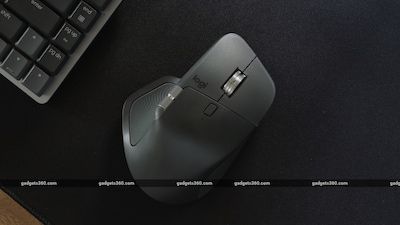
For years, the Logitech MX Master series has been the undisputed king of productivity mice. It’s the tool power users, designers, and coders reach for to tame complex workflows across multiple machines. With the new MX Master 4, Logitech isn’t just iterating; it’s adding a brand-new sensory dimension: haptic feedback. But at a premium price and with a few lingering quirks, does the Master 4 earn its crown, or is it resting on its laurels?
At a Glance
· Target User: Professionals, creators, and power users who spend all day at their computers and value ergonomics and deep customization over gaming performance.
· Key New Feature: The Haptic Sense Panel, a large touch-sensitive button on the left side that provides subtle vibrations and triggers the customizable Actions Ring quick-menu.
· Price Point: Positioned as a premium upgrade (around Rs. 15,995 in India), roughly Rs. 3,000 more than the still-excellent MX Master 3S.
· The Verdict: An excellent but incremental evolution. It refines an already-great design but doesn’t solve all the series’ traditional limitations. It’s best for those new to the Master series or whose old mouse has died, but a tough sell for current Master 3S owners.
✨ What’s New & Refined?
Logitech focused on meaningful refinements rather than a complete overhaul.
· The Haptic Sense Panel & Actions Ring: This is the headline act. Pressing the large panel on the left side gives a satisfying vibration and opens the Actions Ring—a radial menu with 8 customizable shortcuts. Need to lock your PC, mute audio, or open an AI tool? Press, drag in a direction, and release. It feels gimmicky at first but becomes surprisingly intuitive muscle memory.
· Smarter, Cleaner Materials: Gone is the rubberized coating from older models that could get sticky over time. The top shell now has fine grooves for grip, and the main buttons use a smooth polycarbonate. It’s more durable and easier to clean.
· Thoughtful Design Tweaks: The thumb wheel is more exposed and easier to use. The annoying ledge next to the right-click button is gone, and the main MagSpeed scroll wheel is quieter.
· Repairability Win: The screws for battery replacement are now exposed, so you don’t have to destroy the mouse skates to access them—a small but significant nod to longevity.
Performance & Daily Use Experience
In daily use, the Master 4 is a comfortable powerhouse with a few caveats.
· Ergonomics & Comfort: The iconic, angled shape remains supremely comfortable for long sessions. The reviewer noted no wrist pain after weeks of use. However, at 150g, it’s 25g heavier than its predecessor, which is noticeable.
· Performance Quirks: The core sensor is accurate, but the low 125Hz polling rate remains. Compared to modern productivity mice like the Razer Pro Click V2 (1,000Hz), the cursor can feel less instantly responsive, especially on high-resolution monitors. Wireless connectivity with the Bolt receiver was mostly stable but had occasional “shaky” days.
· The Battery Life: The larger 650mAh battery powers the haptics but delivers a similar ~2-month lifespan as the Master 3S with typical use. You can extend it by turning haptic feedback off.
⚠️ The Elephant in the Room: Software Dependence
The MX Master 4’s greatest strength is also its potential Achilles’ heel: Logi Options+.
· Deep Customization: This app is essential to unlock the mouse’s potential, letting you remap every button, adjust scroll speed, and sync settings across computers.
· A Single Point of Failure: During the review, a software certificate expiration caused the app to crash for a day. This broke all custom functions, reverting the mouse to basic defaults. It highlights a critical flaw: your expensive, customized workflow is entirely dependent on an app that is occasionally fallible. The mouse also cannot store profiles on-device.
Should You Buy the Logitech MX Master 4?
This isn’t a simple yes or no. Your decision depends entirely on your situation.
Who it’s for:
· Newcomers to the Master series who want the best-in-class productivity mouse with the latest features.
· Professionals whose MX Master 2 or 3 has finally given up, and who want a meaningful upgrade.
· Tech enthusiasts who love the idea of haptic feedback and deep software integration.
Who should reconsider:
· Current MX Master 3S owners. The upgrades are incremental, and the 3S remains 90% of the mouse for less money.
· Gamers or those needing ultra-precise tracking. The low polling rate and weight make it unsuitable.
· Anyone frustrated by software reliance. If the idea of an app controlling your mouse’s core functions bothers you, look elsewhere.
The Competitive Landscape
The Master 4 doesn’t exist in a vacuum. Here are the key alternatives:
· Logitech MX Master 3S: The best value pick. Offers the core Master experience (Quiet Clicks, MagSpeed wheel) at a lower price. Choose this if haptics aren’t a must.
· Razer Pro Click V2 (or V2 Vertical): The best for performance. Much higher polling rate (1,000Hz) for a snappier feel, lighter weight, and excellent ergonomics (especially the vertical model). A great hybrid for productivity and light gaming.
Ultimately, the Logitech MX Master 4 is an excellent mouse that refines a winning formula. The new haptics are fun and useful, and the design tweaks are welcome. However, its high price, software dependence, and lack of performance upgrades mean it’s more of a luxurious evolution than a revolution. For most, the value king remains the MX Master 3S, but for those seeking the absolute latest and greatest in productivity peripherals, the Master 4 stands at the ready—just be aware of the strings attached.
For latest deals and offers visit our home page https://offerdesk.in or join our telegram channel https://t.me/offerdeskindia